Photograph your paper menu. Take orders today.
Turn the menu you already have into a mobile ordering page with a QR code and card payments that land in your own account. Built for concession stands, food trucks, and pop-ups.
- Live in an afternoon
- Customers need no app
- Paid out directly to you
- Pennies per order, capped at $29/mo
Serve-It Menu is available as a native app: Download on the App Store · Get it on Google Play
Menu in your hand to first paid order
1. Photograph your menu
Upload up to six photos of the menu you already have and Serve-It reads it into a draft — items, prices, categories. Review it, fix anything it misheard, publish. Already on Square? Import the catalogue you have instead.
2. Put your code out
You get a printable QR code and a plain link. Tape the code to the window, drop the link in your Instagram bio. Customers order from their own phone — no app, no account, no download.
3. Run the rush
Paid orders land on the kitchen display the moment they are placed, or print straight to a receipt printer. Bump them through prep and ready, and the customer's phone updates itself.
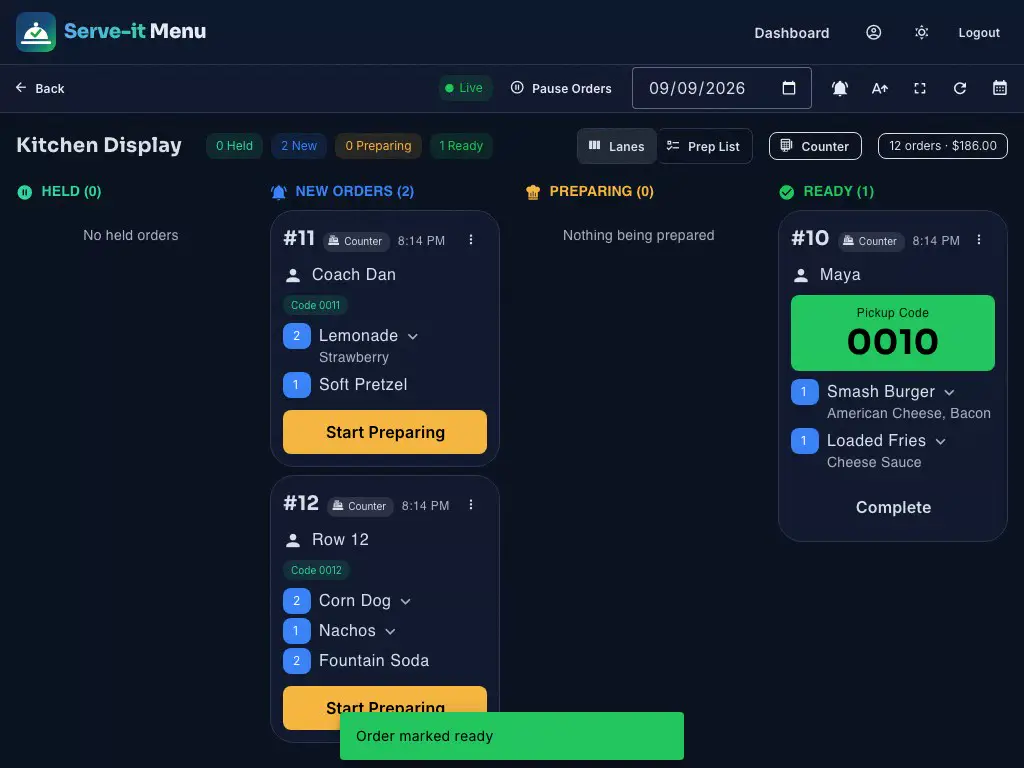
What the kitchen sees
Every paid order lands here on its own. One tap starts it, one tap marks it ready, and the customer's phone shows the pickup code.
Everything you need. Nothing you don't.
Menu from a photo
Point a camera at your printed menu and get a working digital one. Nothing is saved until you approve the draft.
Kitchen display
New orders appear live over a websocket — no refreshing, no polling. If nobody has the screen open, the order emails your venue instead.
Receipt printers
Star CloudPRNT printers are supported directly, so tickets print in the kitchen without a computer in the middle.
TV menu board
Cast your live menu to a screen on site in a column, card, or rotating layout. It updates itself when you change a price.
Scheduled pickup
Open pickup windows for preorders, markets, and game days. Paid orders reach the kitchen display right away so you can prep ahead, or set a window to hold them and fire to the kitchen on its own just before the slot.
Stripe or Square
Keep the Square account you already run on, or set up fresh with Stripe — including a countertop card reader we'll walk you through ordering. Money settles into your account — Serve-It never holds it.
Staff with real roles
Four levels, so a line cook can bump orders without seeing payouts and a manager can edit the menu without touching bank details.
A page Google can find
Every venue gets a server-rendered storefront with its hours, menu, and structured data — so you turn up in search even with no website.
Sales reports
Daily revenue, order counts, and best sellers, without exporting anything to a spreadsheet.
Who it's for
- Concession Stands
- Food Trucks
- Pop-Up Kitchens
- School Events
- Farmers Markets
- Festivals
- Pickup Preorders
- Auto Detailers
- Beauty Services
A few pennies per order. No subscription.
- Under $8: $0.10 per order — Snacks, drinks, and quick low-ticket orders.
- $8 – $11.99: $0.15 per order — Everyday pickup orders and lighter tickets.
- $12 – $17.99: $0.20 per order — Fuller meals, bundles, and mid-range packages.
- $18+: $0.25 per order — Large tickets, without a percent-of-sale cut.
What you actually keep
| Order | Card processing | Serve-It fee | You keep |
|---|---|---|---|
| $6.50 (Drink and a snack) | $0.49 | $0.10 | $5.91 |
| $12.00 (Burger, fries, a drink) | $0.65 | $0.20 | $11.15 |
| $25.00 (Family order) | $1.03 | $0.25 | $23.72 |
Stripe rates (2.9% + 30¢). Square on its free plan is 3.3% + 30¢, so take-home is a few cents lower. Serve-It never touches the money — it settles straight into your own Stripe or Square account.
What venues pay
- No subscription and no contract
- The per-order fee is yours, not a surcharge on your customer
- Your customers never pay a card fee — dual pricing (posted prices are the card prices, cash can earn a discount) is built in and legal in all 50 states
- Fees stop entirely once you hit $29 in a month
- Food menus and service lists price the same way
- Card processing is billed by Stripe or Square, not by us
Monthly maximum: $29. After that, Serve-It platform fees are waived for the rest of the month.
The questions worth asking first
What does this actually cost me?
Two things, and we would rather you saw both. Serve-It charges 10¢ to 25¢ per order depending on the ticket size, and stops charging for the rest of the month once those fees reach $29. Your card processor charges separately: Stripe is 2.9% + 30¢, and Square on its free plan is 3.3% + 30¢. On a $12 order paid through Stripe you keep $11.15.
When do I get paid?
On your processor's normal schedule, because the money never comes to us. Checkout settles directly into the Stripe or Square account you connect, and Serve-It's per-order fee is taken out at the same time. There is no Serve-It balance to withdraw and no payout delay we control.
Do I need to buy any hardware?
No. A phone or tablet with a browser is enough to run the kitchen display, and customers use their own phones. If you want to take cards at the counter, a Stripe reader (from $59, one-time) or a Square Terminal ($299) lets Serve-It charge the card directly at in-person rates — setup walks you through ordering and pairing one. And if you would rather have paper tickets, Serve-It talks to Star CloudPRNT receipt printers directly. All of it optional — the Hardware & Setup guide at serveitmenu.com/hardware-guide walks through every setup from $0 up.
Do my customers have to download anything?
No. They scan the code or tap the link, order in their browser, and pay. No app, and no account required.
I already use Square. Do I have to switch?
No — connect the Square account you already have, and you can pull your existing catalogue across instead of retyping it. If you're curious what switching to Stripe would save, the payments page computes it from your own orders — including the places where Square is the better deal (free disputes, next-day payouts). And if you do switch, your Square Terminal stays connected as a backup.
I sell services, not food. Does this still work?
Yes, and it says the right words when you do. A service venue gets a bookable service list rather than a menu, a simple status board instead of a kitchen display, and its storefront is marked up as a local business rather than a restaurant.
How long does setup really take?
The slow part is normally payments — connecting Stripe or Square and letting them verify you. Building the menu is minutes if you import from photos or from Square. Most venues can be taking real orders the same day.
Can I add my staff?
Yes, with four levels of access. Operators can work the kitchen display and move orders along. Menu admins can edit the menu, fulfillment, and reports. Finance admins add payment and venue settings. Owners can do everything, including managing staff.
Can customers order ahead for a specific day?
Yes. Open a pickup window for the day, or a repeating one for every Saturday market, and customers choose it at checkout, up to the cutoff you set. Each item can carry its own stock for that window, so the last dozen sells out on the page instead of at the tent. Items like custom cakes can instead ask for a date: set the notice you need on the item and the ordering page only offers dates that far out.
Can customers order ahead for later today?
Yes. Turn on held orders in your venue settings and a customer can pay now, pick a pickup time, and the kitchen gets the ticket a few minutes before that time — you choose how many. They can also hold an order until they arrive and release it from their phone.
Your menu is already written. Put it to work.
Photograph it, share the code, and take your first paid order today — without a POS contract or a monthly bill.